Home Lab Reloaded
Overview
In tha past year I had an Homelab setup done with an old Intel NUC (centrino) which also supported me as DHCP. The NUC was bought on march 2014: an Intel DCCP847DYE Desktop Computer (Celeron 847 1Ghz with DDR3 memories).
I packed this humble machine with a lot of docker images, from uptime to remote backups, and it worked quite well.
It was the machine I used to develop and tune misterio, my tool to manage a pool of docker machine as a cluster.
The Baseline
The centrino was fine, but it had some major issues:
- The consumption was around 17-20 Watt and I want to reduce it further, if possible.
- The machine was painful slow for today standards, even if I used super tricks to speed it up (like storing /tmp on RAM)
- The machine was limited to 8GB
- The chip was Meltdown-vulnerable and mitigations make it even slower, so it ran without mitigations (thank you Linux for make me easy to disable them). But I cannot expose it on Internet, it was a risk.
- Disk was a 120Gb mini-SSD filled by half, very pricy to replace.
- It was a single point of failure, and backup was hard
On the bright side:
- It was always on, so batches can take time and it was not an issue
- 8Gb seems little, but thank to Debian Linux it was super-stable
- I attached an old mechanical hard disk as “backup” drive, to further reduce consumption.
This server hosted some critical components for my home lab, and one of them was PIHole: it is a DNS sinkhole that protects my devices from unwanted content, without installing any client-side software. PIHole proven to be very effective to reduce tracking and increase privacy. Also it cuts advertise from the root.
Nasty Router issues
My TIM router (Sagemcom F5684) has a bug on its DHCP daemon: it seems to crash every 24 hours, and it was a pain. I had an hard time to discover the problem, because when I rebooted the router, it started to work a again for a while, and lack of DHCP is not easy to diagnose. I need to thank the Windows 11 diagnostic tool which was able to tell me the root cause.
My network has over 20 CLIENTS by the way: iPhone, Computers, tablet, Shelly plugs, iRoomba, mesh repeaters seem to force the limit of the TIM router dhcp software.
I fixed this issue using PIHole DHCP feature, which is very snappy and also permit me to have stricter control on my subnet. So pihole need to be always on and it is a mission critical piece of my network.
The Target System
I want a powerful setup, and I want to consume it less than the current solution. I targeted my MacMini M1 as an ideal platform. I need a solid docker container engine, and I decided to give orbstack a spin. Orbstack is a commercial solution, but it is free for personal use; my solution did not depend directly on it, because I use docker compose systems managed my misterio.
Orbstack has some nice feature:
- It is highly optimized
- It can run Intel-based images with Rosetta.
- It is very easy to share host directories (I had some trouble with colima)
- Does not require you to login to spin the images (so a reboot is not an issue)
Also, I had a lot of issue with folder sharing/mounting with colima: Orbstack is quite effective and easier to set up (just 1 security pop up at the first start).
The Route to power
I have some setback when trying to migrate PIHole, because I was unable to run DNS on my setup. It seems orbstack is unable to run docker images on the same host network interface (it uses a LinuxVM as a pass-through). I tried to ask Claude some solutions, but none of them worked.
So I decided to use my super old RaspberryPI2 Model B as super-energy effective DHCP/DNS server. I was able to install on it a brand new PIHole (it is its primary platform BTW).
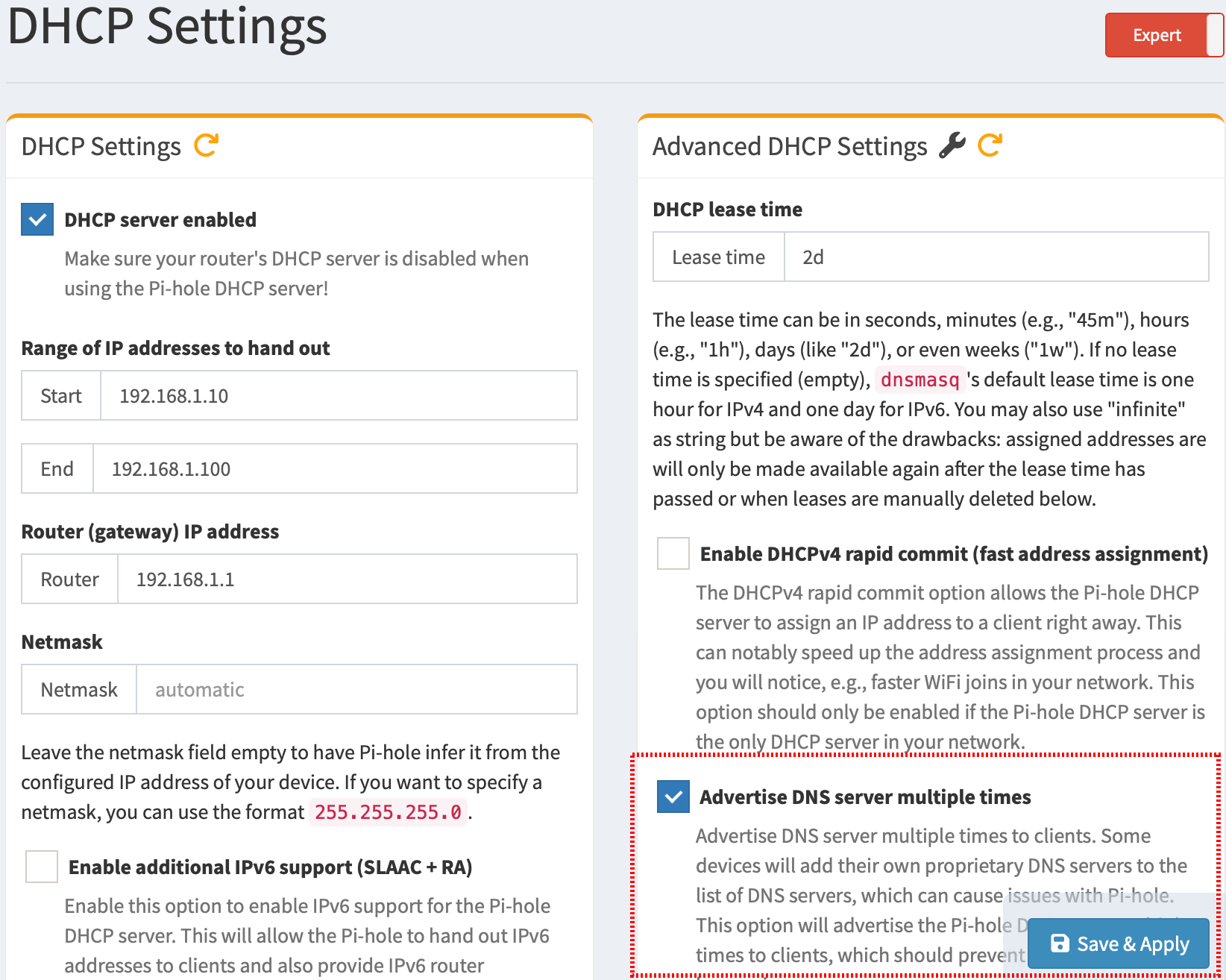
PIHole DHCP configuration is quite flexibile: the DHCP can be configured to advertise PIHole as DNS, even if your evil router do not let you do it Just select “Expert Mode” and then enable the option named “Advertise DNS server multiple times”
Posts in Homelab series
- MacBookPro 2009 & macOS 10.8 save diary // Feb 24, 2020
- PiHole Lockdown // Nov 18, 2020
- Mini Server @ Home // May 23, 2023
- FreeBSD on MacBook Mid 2009 with BroadCom WIFI // Jul 21, 2025
- Immich e Paperless: take control back! // Jan 12, 2026
- Home Lab Reloaded // Apr 2, 2026